Assess practical skills on video, from anywhere.
Remote Reviewer lets learners film a practical task and assessors review it against your checklist, with timestamped comments on what they saw. Every decision is saved as an audit-ready record that you own, ready to show ASQA under the Standards for RTOs 2025.
RTO directors and operations managers: see your time and cost savings in 30 secondsFree plan. No credit card. Compare plans. Works with Moodle and any LTI 1.3 LMS.
- 2,000+ reviews completed
- 45+ organisations
- 85+ record stores connected
- 50,000+ records captured
LearnX 2024 Gold for Best EdTech Innovation, a Strategic Partner of ILP Asia Pacific, and based in Brisbane, built for Australian RTOs.


Set it up once. Review from anywhere.
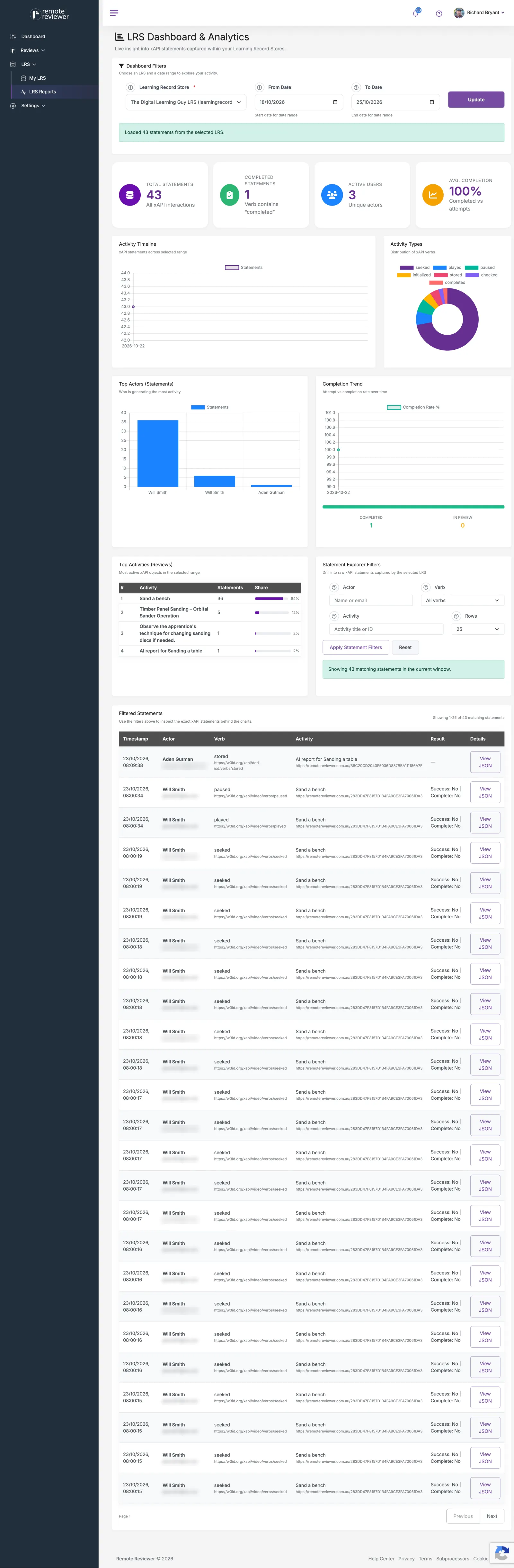
Remote Reviewer runs evidence through three steps: capture video or audio of the practical task, review it against structured criteria with timestamped comments, then store the outcome as portable xAPI data in a Learning Record Store you control.
-
Step 1

Capture
- Capture secure video, audio, or linked evidence of practical work.
- See what actually happened in training, on site, or in the workplace.
- No relying on site visits or scattered files.
-
Review
- Assess against clear criteria and your own checklists.
- Reviewer comments and timestamps link directly to what was observed.
- Each decision is documented, explainable, and easier to defend.
-
Record
- Store records in a Learning Record Store you own, or use one we provide.
- Portable xAPI data: records you own and can take with you, not locked inside one platform.
- Evidence stays accessible and easier to report on over time.
xAPI is the open format Remote Reviewer saves every assessment record in. You don't need to know how it works. Here's what it means for compliance managers and trainers:
-
Your evidence, your property
Records are kept in a Learning Record Store you control. If you change systems or providers, your assessment evidence comes with you. No platform lock-in.
-
Audit-ready by default
Every record says who was assessed, what they did, the criteria used, who decided and when. The same trail is there when ASQA or a moderator asks, with nothing to rebuild.
-
Future-proof
xAPI is an open standard used across the training industry, so your records stay readable and reportable as your LMS, SMS and other tools change over the years.
Learning Record Store (LRS): a database that stores structured learning and assessment records in the xAPI format, so evidence can be queried, reported on, and moved between systems instead of being locked inside one platform.
See these steps in a real account: explore short walkthroughs and use-case demos on our YouTube channel.
See what remote reviewer is worth to you.
Built for busy RTO directors and operations managers. Start with the travel and waiting time remote review removes. For a fuller picture, our free ROI calculator estimates the time and cost savings from replacing manual assessment workflows with Remote Reviewer. Enter your assessor count, review time, and assessment volume to get a personalised estimate.
Remote Reviewer doesn't replace your LMS or your SMS. It fills the gap they weren't built for.
LMS, SMS and Remote Reviewer: who does what?
Your LMS delivers the learning. Your SMS manages enrolments and results. Remote Reviewer captures and assesses the practical skills in between, then hands the outcome back.
| LMS (e.g. Moodle) |
SMS (student management) |
Remote Reviewer | |
|---|---|---|---|
| Main job | Deliver courses, content and quizzes | Enrolments, USIs, results and AVETMISS reporting | Capture and assess practical skills on video |
| Evidence of the practical task | A file upload, if anything | Not held | Video of the task, filmed or uploaded |
| Assessed against your checklist | Quiz and assignment marking | No | Observation checklist with timestamped comments |
| Shows why the decision was made | The grade | The final result | Evidence, criteria, comments and assessor, linked |
| Audit trail for ASQA | Partial | Results, not evidence | A complete record you own |
| Do you keep it? | Yes. Remote Reviewer runs inside it | Yes. It stays your system of record | Adds to both, replaces neither |
Learners record inside your Moodle or LTI 1.3 course and results flow back to the gradebook (plans with API access). Your SMS stays the system of record for enrolments and reporting.
Platform by the numbers
Real usage from real organisations using Remote Reviewer to capture and review practical skills evidence.
- Reviews completed
- 2,000+
- xAPI statements recorded
- 50,000+
- Organisations
- 45+
- Learning Record Stores connected
- 85+
Everything you need to defend a decision.
Link assessor comments, timestamps, and criteria directly to evidence so outcomes can be explained, reviewed, and defended when challenged.
Keep videos, notes, feedback, and review decisions linked together so nothing important is lost between submission, review, and follow-up. All linked using the xAPI Open Standard.
Structured review checklists help assessors apply the same criteria consistently, supporting assessor quality assurance and moderation requirements.
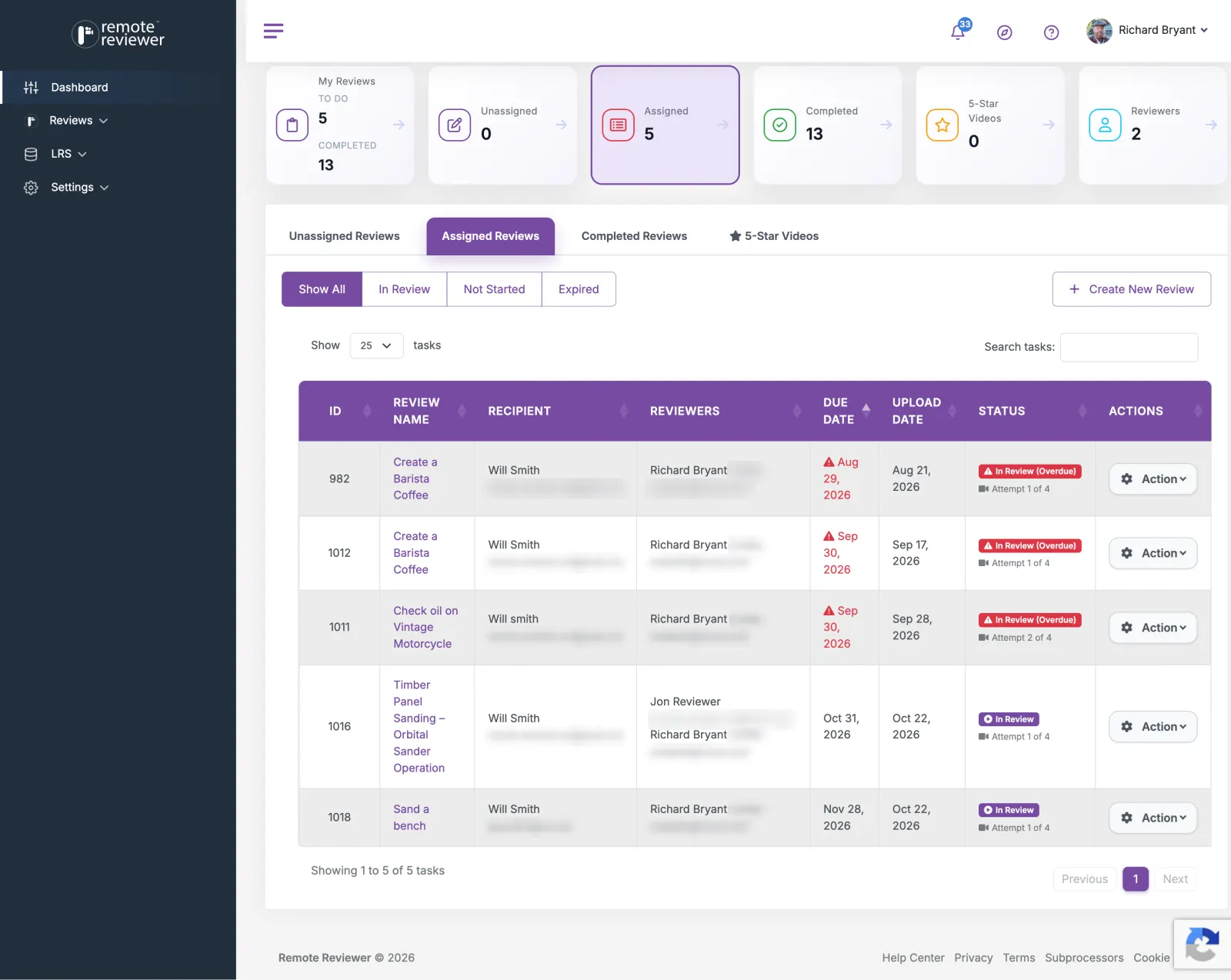
Create tasks, assign checklists, invite reviewers, and manage assessment workflows. Give assessors a clearer structure so outcomes are less dependent on personal workarounds.

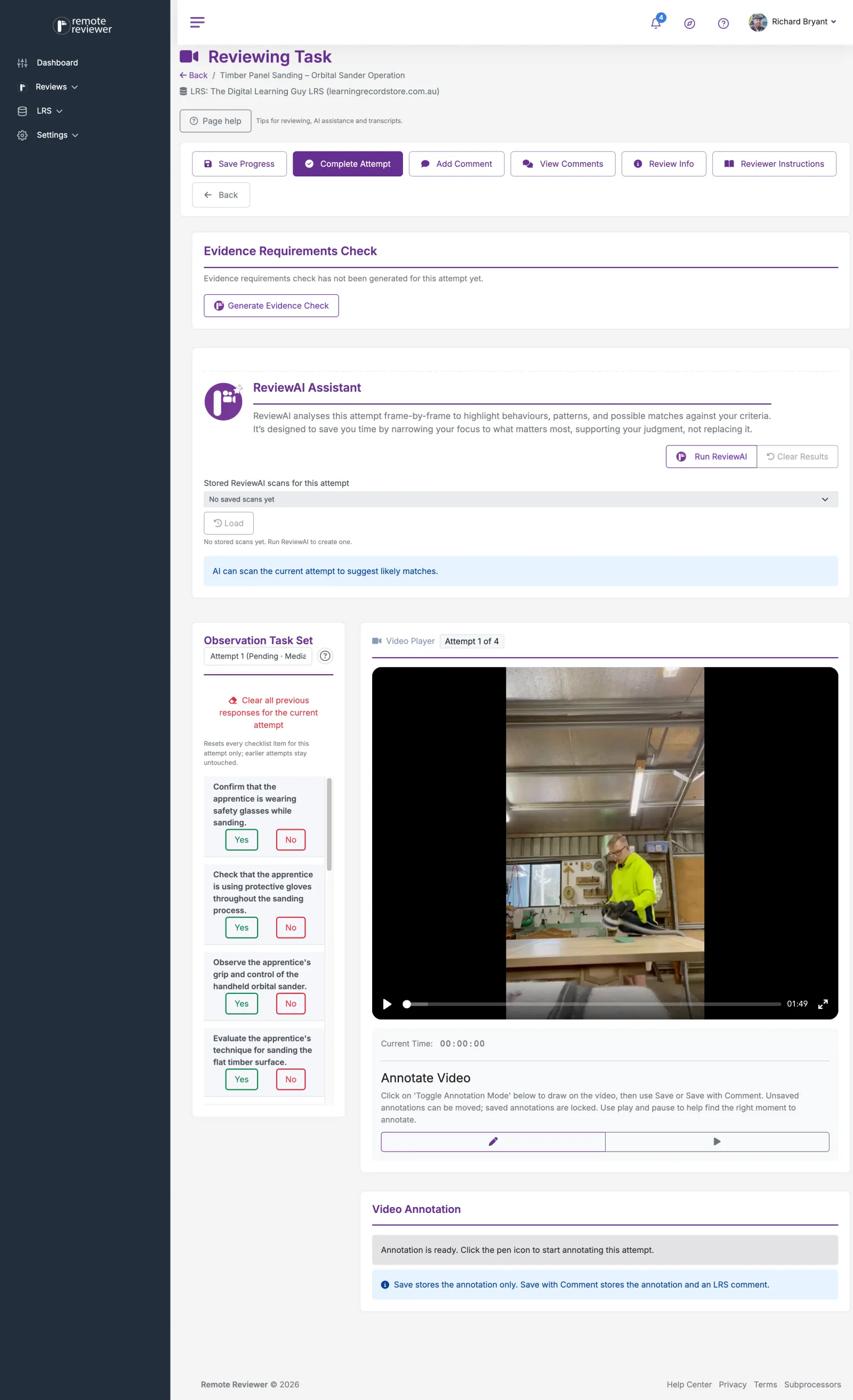
ReviewAI is an assistive layer, not a decision-maker: it drafts task checklists, flags likely evidence segments, checks submissions against evidence rules, and summarises reviews, while the human assessor makes every final call.
- Faster task setup. Build task sets and checklists faster with AI-assisted authoring, so new assessments are ready to run sooner.
- Point reviewers at what matters. ReviewAI indicates likely evidence segments against your criteria, cutting down the time spent scrubbing through recordings.
- Check evidence before it reaches a reviewer. Evidence Requirement Checks confirm uploads are valid, sufficient, authentic, and current against the rules of evidence.
- More consistent decisions. AI checks support consistency across a review team, and AI-generated review summaries make audit and moderation prep faster.
ReviewAI is an assistive capability. It supports the review process; the assessor always makes the final decision.
Capture candidate consent and self-identification before any evidence is recorded. Write your own consent message to match your policies, and choose whether consent is required before a candidate can continue, so every submission has a consent record alongside it.
Every time a participant accepts or declines the recording consent notice, Remote Reviewer stores a record of when it happened, the device used and the exact wording they were shown. The full consent history is visible on the review, even if your organisation doesn't use a Learning Record Store, so it's there when you need it for quality checks or audit requests.
Clear review trail. Keep submissions, feedback, and decisions together so moderation, quality review, and audit requests are easier to handle.
Your organisation keeps control. Your organisation keeps control of its own evidence and records, rather than relying on disconnected files and notes spread across multiple tools.
Maintain complete evidence records for moderation, quality review, and audit without rebuilding the story from scattered notes and attachments.
The Standards for RTOs 2025 require assessment decisions to be evidence-based, consistent, and backed by documented continuous improvement. Remote Reviewer meets this by linking every review decision to timestamped video evidence, applying structured rubrics, and storing records as portable xAPI data RTOs can report on.
When ASQA (the Australian Skills Quality Authority) audits, you need to show how each assessment decision was reached. Every Remote Reviewer record shows who was assessed, video of what they did, the criteria applied, the assessor's comments at the moment they observed it, the candidate's consent, and who made the decision and when, so your compliance team can produce the evidence trail directly.
- Evidence-based assessment decisions. Every assessment decision is tied to what was actually observed, not reconstructed from memory or scattered notes.
- Assessor currency and consistency. Structured review checklists help assessors apply the same criteria consistently.
- Audit-ready records. Records are stored using the xAPI open standard, keeping evidence portable, structured, and audit-ready without manual reconstruction.
- Defensible assessment outcomes. Assessor comments, timestamps, and criteria link directly to evidence.
- Continuous improvement support. xAPI data gives training teams the reporting layer to identify patterns, track performance over time, and demonstrate continuous improvement processes.
- Consent recordedTime, device and exact wording stored
- Evidence uploadedVideo of the practical task, attempt 1
- Reviewer assignedReviews against the shared checklist
- Comment at 00:42Linked to the moment it was observed
- Outcome confirmedThe assessor makes the final decision
- xAPI statement sent to your LRSA portable record you own
Used across industries for practical assessment.
Remote Reviewer is used by three groups: RTOs and training providers capturing evidence for compliance, workplace assessors reviewing on-the-job performance, and compliance or quality teams preparing for audits and moderation.
-
RTOs and training providers
Collect practical evidence without chasing files across inboxes and drives. Keep assessors, learners, and records aligned in one workflow.
-
Workplace assessors
Review recorded submissions on your own schedule, apply the same criteria each time, and leave feedback linked to what was observed.
-
Compliance and quality teams
Maintain complete evidence records for moderation, quality review, and audit without rebuilding the story from scattered notes and attachments.
-

Construction and trades
Capture video evidence of on-site practical tasks. Assess compliance with safety standards and trade competencies without requiring in-person observation at every site.
Learn more about construction and trades -

Remote skills assessment
Review remote workers or distributed teams against clear performance criteria. Keep evidence and decisions together without coordinating site visits.
Learn more about remote skills assessment -

Workplace risk assessment
Collect structured video evidence of workplace risk scenarios. Maintain a defensible record of what was observed, reviewed, and actioned.
Learn more about workplace risk assessment -

ESL and language assessment
Record spoken language tasks and assess oral competency against defined criteria. Ideal for language schools and ELICOS providers needing evidence of spoken performance.
Learn more about ESL and language assessment -

Mock interviews and role play
Capture mock interview or role play scenarios for structured feedback and coaching. Give learners repeatable practice with documented assessor review.
Learn more about mock interviews and role play -

Presentations and demonstrations
Review recorded presentations or practical demonstrations against assessment rubrics. Provide timestamped feedback and keep evidence linked to decisions.
Learn more about presentations and demonstrations
Ideal for training providers, workplaces, compliance teams, and assessors who need a simple way to capture, review, and verify real-world performance evidence.
- Vocational training
- Workplace competency checks
- Compliance evidence
- Site and field assessments
- Safety observations
Fits the systems you already run.
Remote Reviewer runs inside your learning management system using the LTI 1.3 standard, gives you one place to see everyone you've sent a review to, lets you tag people with your own fields (on selected plans), and keeps a full record of every consent decision.
- LTI 1.3
- xAPI
- Your LRS
- iOS and Android
-
Plans with API access
LMS integration (LTI 1.3)
Built on the LTI 1.3 standard, works with Moodle and other LTI 1.3 platforms. An LMS admin connects Remote Reviewer, usually in a few clicks. Teachers add a Remote Reviewer activity to their course and choose one of your templates.
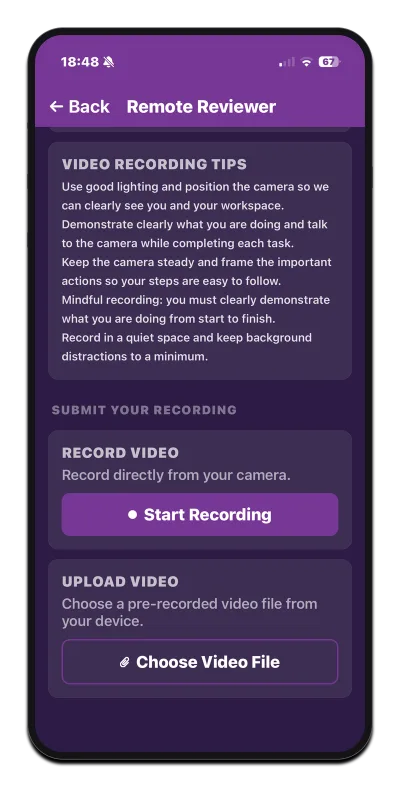
Learners record or upload their video and see their status and reviewer feedback without leaving the course, and pass/fail results flow back to the gradebook automatically.
-
Open standard
xAPI
xAPI (Experience API): an open data standard used across the learning and training industry to record structured statements about what a person did, such as "Learner completed Task X, assessed by Reviewer Y, on Date Z", so records can move between systems instead of being locked inside one platform.
In plain English: evidence you own, ready for audit, and not tied to any one vendor. What this means for you
-
85+ connected
Your LRS
Store assessment records in a Learning Record Store that you control, or use one we provide, so evidence stays accessible and easier to report on over time.
Remote Reviewer outputs xAPI statements that can be sent to a Learning Record Store you already use. We currently have 85+ Learning Record Stores connected.
-
All plans
Recipients
One place to see everyone your organisation has sent a review to, with each person's open and completed reviews. Open a person to see all their reviews, jump straight to results or feedback, and correct their name or email across every review at once. Access is controlled by user roles and permissions.
Recipient Fields (selected plans): define your own fields for the people you assess, such as Department, Location or Job Role. Fields can be dropdowns (single or multiple values), text, number or date. Admins manage the dropdown values, recipients are tagged with them, and the Recipients list can be filtered and searched by any field. Setup is admin-only and controlled by roles.
Technical details available when needed. If you need deeper reporting or integration detail, we can help.
Ask usHow is Remote Reviewer different from LMS platforms and video interview tools?
Remote Reviewer is the only platform in this comparison built specifically for criteria-referenced practical skills assessment. LMS platforms manage courses, and video interview tools screen candidates. Neither combines video evidence capture, structured rubrics, timestamped feedback, and xAPI-based audit trails the way Remote Reviewer does.
| Capability | Video interview tools | LMS platforms | Generic video tools | Remote Reviewer |
|---|---|---|---|---|
| Video evidence capture | Yes | Sometimes | Yes | Yes |
| Criteria-referenced review rubric | No | Partial | No | Yes |
| Structured assessor feedback | No | Partial | No | Yes |
| Timestamped comments tied to evidence | No | No | No | Yes |
| xAPI output to external LRS | No | Sometimes | No | Yes |
| Audit-ready records | No | Partial | No | Yes |
| AI-assisted evidence review | No | No | No | Yes |
| Human judgement at centre | Partial | Partial | No | Yes |
| Built for post-hire practical skills | No | Partial | No | Yes |
| Compliance-forward (RTO/VET/industrial) | No | Partial | No | Yes |
Why do manual assessment workflows fail for practical skills evidence?
Manual assessment breaks down because evidence is scattered across inboxes, shared drives, and personal notes, so reviews become inconsistent and audits mean reconstructing what happened after the fact. Remote Reviewer fixes this by capturing video evidence, structured review decisions, and audit-ready records in one connected workflow.
| Assessment stage | Manual process | With Remote Reviewer |
|---|---|---|
| Evidence collection | Spread across inboxes, folders, and disconnected documents | Captured as secure video evidence in one workflow |
| Review decisions | Depend on memory, local notes, or inconsistent interpretation | Made against clear, criteria-referenced rubrics |
| Audit and moderation | Files are hunted down and the story rebuilt after the fact | Records stay audit-ready and linked from day one |
Less admin overhead
Stop moving submissions between tools just to get evidence reviewed and signed off.
More consistent reviews
Give assessors a clearer structure so outcomes are less dependent on personal workarounds.
Stronger records
Retain evidence and decisions in a format that supports quality checks, moderation, and compliance review.
Reduce admin
Give assessors, supervisors, and trainers one place to manage evidence, assign reviews, and make decisions faster without chasing files, emails, or paper-based sign-offs.
Simple, transparent pricing.
Start free, test the workflow, and upgrade as usage grows. All prices are in AUD. The free tier is best for testing the workflow and small-scale use.
-
Free/Pilot
$0AUD / month
Includes everything you need to try remote reviewing and understand the workflow end‑to‑end.Ideal for pilots, demonstrations, and getting familiar before scaling up.
Start for free with Free/Pilot- Up to 5 reviews per month
- Up to 5 reviewers
- File upload
- Direct recording
-
Team Reviews
$69AUD / month
Designed for teams that need to review video or audio evidence occasionally, without committing to high ongoing volumes. Perfect for trialling Remote Reviewer, validating specific skills, or managing one‑off observations and sign‑offs.
Start plan with Team Reviews- Up to 75 reviews per month
- Up to 75 reviewers
- File upload
- Direct recording
- AI-powered features
-
Organisation Reviews
Most popular$149AUD / month
Support consistent review workflows across teams or programs with predictable monthly reviewing needs. Well suited to RTO delivery, workplace competency checks, and recurring compliance or performance reviews.
Start plan with Organisation Reviews- Up to 150 reviews per month
- Up to 150 reviewers
- Bring your own S3 storage
- Google Drive storage
- Dropbox storage
- OneDrive storage
- Bulk reviews (CSV upload)
- Reviewer performance reports
- File upload
- Direct recording
- API access
- LMS integration (LTI 1.3)
- AI-powered features
- AI-generated reports
- ReviewAI assistant
- ReviewAI Evidence Rules
- Custom recipient fields
-
Scale Reviews
$349AUD / month
Designed for high‑throughput environments where reviewing evidence is part of day‑to‑day operations. Ideal for large training providers, regulators, and multi‑site organisations needing scalable, defensible review processes.
Start plan with Scale Reviews- Up to 300 reviews per month
- Up to 300 reviewers
- Bring your own S3 storage
- Google Drive storage
- Dropbox storage
- OneDrive storage
- Face blur for bystander privacy
- White label branding
- Bulk reviews (CSV upload)
- Reviewer performance reports
- File upload
- Direct recording
- API access
- LMS integration (LTI 1.3)
- AI-powered features
- AI-generated reports
- ReviewAI assistant
- ReviewAI Evidence Rules
- Reviewer star ratings
- Custom recipient fields
-
Organisation
Create tasks, assign checklists, invite reviewers, and manage assessment workflows.
-
Reviewer
Review assigned submissions, provide feedback, and complete assessments when invited.
-
Start small
Use the free tier to test the workflow first, then upgrade when your usage grows.
-
Need more?
Talk to us about custom limits, integrations, or rollout support for your team.
Talk to us
What our customers say.
Real feedback from training providers, assessors, and compliance teams using Remote Reviewer in their workflows.
-
What I love about Remote Reviewer is finally the opportunity to review on a rubric the real world, on the job performance activity, then store it all as xAPI for credentialling and analysis.
 Megan TorranceTorrance Learning
-
Remote Reviewer is a game-changer! It's truly impressive and bound to disrupt the landscape for conducting task performance assessments for on-the-job training. On-the-job performance assessment has always been one of the hardest things to measure and the most important. Remote Reviewer solves that. We're proud to partner with Remote Reviewer. Pairing it with Veracity's LRS means organizations finally have a complete picture: not just what people watched or clicked, but what they can actually demonstrate on the job.
 Jason HaagVeracity Learning
-
Remote Reviewer solves a genuine challenge in learning and assessment: capturing and reviewing performance evidence in a structured and consistent way. I've been particularly impressed by how it supports meaningful feedback, clear assessment workflows, and reliable evidence collection. It offers a flexible solution for vocational education, workplace learning, compliance, and practical skills assessment.
 Glenn HammondeLearning Specialist
Questions, answered.
Questions before you sign up? Here are the basics.
Yes. Remote Reviewer links every review decision to timestamped video evidence, applies structured rubrics consistently across assessors, and stores records as xAPI data, directly supporting the evidence-based, defensible, and continuous-improvement requirements of the Standards for RTOs 2025.
Remote Reviewer is built to support ASQA audit requirements. Each assessment record links video evidence of the task, the criteria applied, the assessor's timestamped comments, the outcome, who made the decision and when, and the candidate's consent record, so your team can show exactly how a decision was reached. ASQA audits your RTO's practices rather than approving software, so Remote Reviewer supports your assessment system and validation rather than replacing them.
Yes. Remote Reviewer can prompt candidates for consent and self-identification before they record evidence. Your organisation can write its own consent message and choose whether consent is required before the candidate can continue. Every accept or decline is stored with the time, device and exact wording shown, and the full consent history is visible on the review, even if you don't use a Learning Record Store.
Video evidence, reviewer comments, and timestamps are kept linked together in your organisation's own record store, so nothing has to be reconstructed later, and the same evidence trail can be produced directly for an audit or moderation request.
Yes. Remote Reviewer is designed to support flexible record storage, so your organisation can keep control of its assessment data and reporting.
xAPI (Experience API) is an open data standard for recording structured statements about what a learner or candidate did. Remote Reviewer uses it so your assessment records aren't locked into one platform: they can be reported on, queried, and moved between systems.
In plain English: your assessment evidence is yours. It's audit-ready, it outlasts any one system, and you can take it with you if you change providers.
Yes. Remote Reviewer connects to learning management systems using the LTI 1.3 standard and works with Moodle and other LTI 1.3 platforms, so learners can record or upload video inside the course and pass/fail results flow back to the gradebook. LMS integration is available on plans that include API access (see how it works). Remote Reviewer also outputs xAPI statements that can be sent to a Learning Record Store you already use; we currently have 85+ Learning Record Stores connected.
Remote Reviewer helps teams assess practical tasks using video evidence. It gives assessors and reviewers one place to collect submissions, review them against criteria, and keep clear records.
It is built for training providers, workplace assessors, compliance teams, and organisations that need to review practical work remotely or keep evidence of performance.
Yes. You can sign up for free and access the platform with usage limits, so it is easy to try before upgrading.
No. Remote Reviewer is web-based, so there is nothing to install to get started.
You can use YouTube, Vimeo, direct MP4 links, and in some cases upload or record video directly from your device.
Put your next assessment on the record.
Sign up free to start capturing practical skills evidence, or talk to us if you need a walkthrough for your team.
No credit card required. Get started in minutes.
Contact us.
Have questions or want help finding the right setup? Get in touch and we'll help, whether you want a walkthrough or a small pilot to explore how Remote Reviewer can fit your current assessment and review workflow.
- LocationLevel 1, 324 / 241 Adelaide Street, Brisbane City QLD 4000
- Emailinfo@remotereviewer.com.au
- SupportAvailable via email