Video Assessment for Australian RTOs
RTO video assessment uses recordings to help assessors judge practical performance against the requirements of a task or unit. Remote Reviewer gives RTO teams a workflow for learner video evidence, structured criteria, timestamped feedback and documented review outcomes.
Make practical performance easier to review
Many vocational outcomes depend on what a learner can demonstrate in practice. A knowledge quiz can support assessment, but it may not show a person completing a procedure, using equipment, communicating at work or following a safety process. Video can provide a record of observable performance for an assessor to review.
A recording does not by itself establish competency. RTOs need to decide whether the task, conditions and evidence are suitable, and assessors must make decisions against the relevant requirements. Remote Reviewer helps organise the evidence and review process around those decisions.
From task instructions to recorded outcome
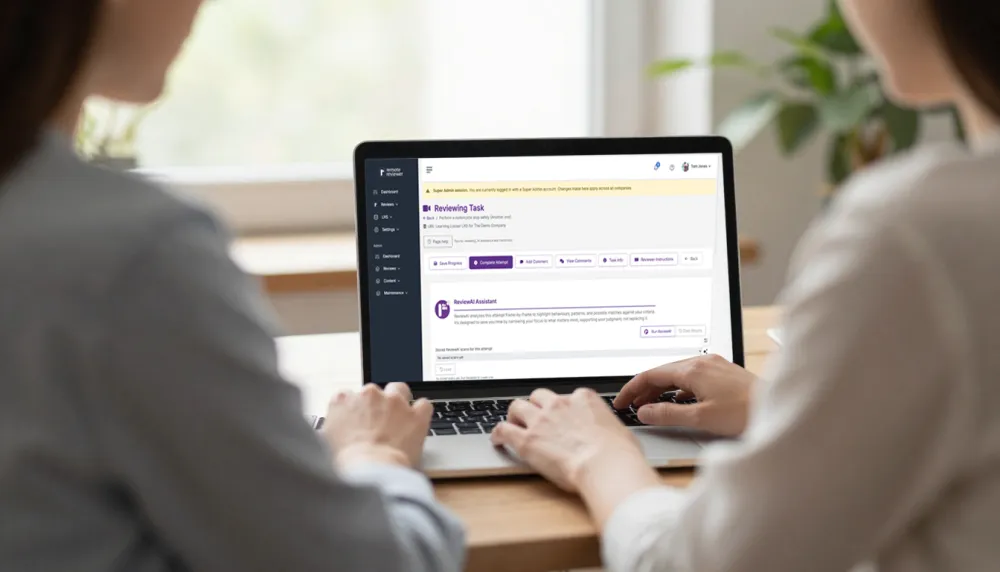
RTO teams can create or select a reusable template, explain the evidence required and invite learners to record or upload a submission. An assessor then reviews the video against the defined checklist, adds timestamped observations and feedback, and records an outcome. The review record keeps the task, criteria and evidence together for follow-up and internal quality processes.
- Set a clear task and explain the evidence the learner needs to provide.
- Use criteria that reflect the assessment requirements and are understood by reviewers.
- Review video evidence and note observations against the relevant moments.
- Keep feedback and the assessment decision associated with the submission.
- Where configured, retain the outcome as xAPI data for an LRS or compatible system.
Support consistent review across assessors
When instructions and criteria vary between assessors, learners may receive different expectations and managers have less visibility into how decisions were reached. Shared templates can make the task and checklist consistent, while recorded observations help explain how a reviewer applied the criteria.
RTO managers and compliance teams can use structured records to support moderation, validation and continuous improvement activities. The platform does not certify compliance or replace an RTO’s policies, validation process or recordkeeping obligations.
Connect assessment to Moodle and xAPI workflows
With LTI 1.3 integration, teachers can add a Remote Reviewer activity to an LMS course and select a template. Learners can record or upload evidence from the course, and reviewers assess it in Remote Reviewer. Pass/fail outcomes can return to the LMS gradebook on plans with API access. Read more about Moodle and LTI 1.3 video assessment.
Remote Reviewer can also produce xAPI statements about assessment activity. An xAPI statement is a structured record of an event, while a Learning Record Store is a system for receiving and querying those records. The RTO can use an existing LRS connection where configured. For the platform overview, see video assessment software for practical skills.
Plan an evidence-led assessment workflow
For broader information about RTO evidence workflows, see our RTO assessment evidence page and VET and RTO resource hub. If you are comparing how a recording should be collected and documented, visit video evidence assessment.
Frequently asked questions
Can RTOs assess practical skills using video?
Video may be suitable where a learner can demonstrate the required performance in a recording and the assessor can judge the relevant criteria. The RTO determines suitability and remains responsible for assessment decisions.
Does Remote Reviewer guarantee RTO compliance?
No software can guarantee an RTO’s compliance. Remote Reviewer supports structured evidence capture and review records; the RTO remains responsible for its assessment system, validation, assessor practice and regulatory obligations.
Can assessors review Moodle submissions?
Yes. Remote Reviewer supports Moodle and other LTI 1.3 LMS platforms. Learners record or upload from the course activity, and pass/fail outcomes can return to the LMS gradebook where configured.
Explore related topics: